How it works
From one phone photo to a full catalogue shoot
No photographer, model or light box. Upload a photo of your earrings, bangles, diya or idol, pick a scene, and download marketplace-ready photos in about a minute.
Walk through a real shoot
Pick a product and step through exactly what you do in Studio. Every photo here was made from an ordinary phone photo.
Walk through MeeShip Studio
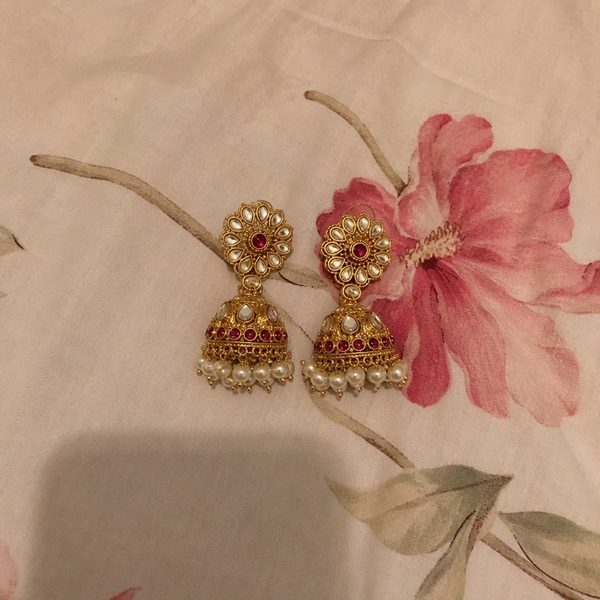
Ordinary phone photo, plain surface, daylight.
Pick the right shoot
Single Shot
1 credit1024 × 1024 px
One scene you pick: display stand, in hand, worn or white hero. The best way to start.
Studio Set
4 credits4 photos, 1024 px each
Four different scenes for your product from one shoot. A complete listing in one go.
HD Shot
3 credits1536 × 1536 px
One scene you pick with more detail. Ideal for your main image and fine stone work.
Credits are valid for the period shown on each pack, and if a photo cannot be made its credits are refunded automatically. See credit packs
Scenes made for your product
What looks real is different for every product: earrings hang from an ear, a diya needs a flame, a keychain hangs from a hand.
Earrings & jhumkas
White hero, worn on ear, display stand, festive
Necklaces & mangalsutra
White hero, on bust, on model, festive
Jewellery sets
White hero, bust with earrings, velvet box flat lay, festive
Bangles & bracelets
White hero, on wrist, bangle roll, festive
Keychains
White hero, in hand, lifestyle, gift box
Photo frames
White hero, on shelf, bedside, gift box
Diyas
White hero, lit diya, rangoli, festive
Idols
White hero, mandir, living room, festive
Puja items
White hero, mandir, festive, lifestyle
Get the best result from your phone photo
01
Soft daylight
Shoot near a window. No flash, direct sun or tube light, which cause glare on metal.
02
Plain surface
White paper or plain cloth. Patterned bedsheets confuse the scene.
03
One product
One product or one pair per photo. No collages, price stickers or text.
04
Room to breathe
The product fills about half the frame and does not touch the edges.
05
Sharp focus
Tap the product to focus, hold steady and wipe the lens first.
Guides
Jewellery product photography at home
The four photos every jewellery listing needs, and how to shoot the one photo Studio starts from.
Studio credit packs and expiry, explained
What each pack gives, how long credits stay valid (7 to 60 days) and how refunds work.
Meesho product photos: before and after
The five problems that weaken a listing photo and the four photos that fix them.
Jewellery ki product photo mobile se kaise banaye
Wahi guide Hinglish mein, Diwali aur pooja products ke tips ke saath.
Questions
Do I need a studio, lights or a model?
No. One ordinary phone photo of your product is enough. Studio creates the background, lighting, model or display stand around your real product.
How long does a shoot take?
A Single Shot or Studio Set usually takes about a minute and an HD Shot about two minutes. Timing can vary when Studio is busy, and the page shows live progress while you wait.
Will my design stay the same?
Studio is instructed to keep every stone, bead, chain and colour exactly as in your photo, and it usually does. AI can still slip on very fine details, so check each photo against your product before listing it.
How do I try it for free?
Sign in and you get 2 free Studio credits, enough for two Single Shots. If a photo cannot be made, its credits are refunded automatically.
Ready for your first shoot?
Sign in, upload one phone photo and use your 2 free credits on two Single Shots.
Open MeeShip Studio